
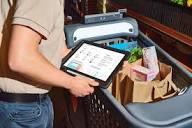
Smart digital grocery shopping and meal planning help organize your food needs, reduce waste, and save trips to the store. Using apps and simple digital tools can make your kitchen life much smoother.
Making Your Grocery Shopping Smarter
Shopping for food can feel like a chore. You go to the store. You buy things.
Then you get home. Sometimes you have too much. Other times, not enough.
This is where thinking digitally can help a lot.
Think about it. Most of us have a phone with us everywhere. We can use that phone to make our shopping trips much better.
This means less stress and more savings. It’s about working smarter, not harder.
We’ll cover different ways to use your phone or computer to get your shopping done. This includes making lists and even planning meals. These digital helpers can change how you think about grocery shopping.
My Own Grocery Shopping Mishaps
I remember one Saturday afternoon. I was rushing to get groceries. My kids were pulling on my pants.
The dog was barking. I scribbled a quick list on a napkin. I thought I had it all down.
I grabbed bread, eggs, and some chicken. I also picked up a few snacks because I was hungry. Then I headed home.
As I unpacked, I saw it. No pasta. No sauce.
No vegetables for the chicken. My carefully planned (but poorly written) meals were ruined. I had to go back out.
That second trip wasted even more time and gas. It was so frustrating! I felt like I had failed at a simple task.
That’s when I really started looking into how to make this whole process easier. I learned that a little planning goes a long way.
Smart Shopping List Apps
These apps help you build lists easily.
- Keep Track: Add items as you think of them.
- Share Lists: Send your list to a partner or family member.
- Organize by Aisle: Some apps group items by store layout.
- Scan Barcodes: Add items by scanning what you already have.
Why Digital Meal Planning Works
Planning meals means deciding what you will eat. You do this before you go to the store. This sounds simple.
But it helps a lot. When you plan meals, you know exactly what food you need.
This stops you from buying extra things. You also buy fewer impulse items. Impulse buys are things you don’t really need.
They are often snacks or treats. They add up fast. Meal planning also helps you use up food you already have.
This means less food waste. Wasted food is wasted money.
Digital tools make this planning easier. You don’t need stacks of paper. Everything is in one place.
You can see your whole week. You can easily change things. It’s a flexible way to manage your food.
Benefits of Digital Meal Plans
What you gain by planning ahead:
- Less Food Waste: Use what you buy.
- Save Money: No more impulse buys.
- Save Time: Fewer trips to the store.
- Healthier Eating: Plan balanced meals.
- Reduced Stress: Know what’s for dinner.
Connecting Shopping Lists and Meal Plans
The best part is when your meal plan and shopping list work together. Many apps can do this. You pick your meals for the week.
Then, the app automatically makes a shopping list. It pulls the ingredients needed for those meals. This is a huge time saver.
It also makes sure you don’t forget anything. You can then take this list to the store. Or, you can even send it to an online grocery service.
This is the future of smart shopping.
Think about it. You decide you want tacos on Tuesday. Then spaghetti on Wednesday.
The app knows you need ground beef, taco shells, and salsa for Tuesday. It also knows you need pasta and marinara sauce for Wednesday. It adds these to your list.
You can then add other things you need, like milk or bread. Everything is in one place. It’s very neat.
How They Work Together
A smooth workflow:
Step 1: Choose Meals
Pick recipes for the week.
Step 2: Generate List
App creates a shopping list from recipes.
Step 3: Add Extras
Add items not in recipes (like snacks).
Step 4: Shop Smart
Use the organized list at the store.
Popular Digital Tools for Shopping and Planning
There are many apps and tools out there. Some are simple. Some are very fancy.
You can find ones that fit your needs and your phone. Many are free to start. You can try them out to see what works best for you.
Some apps focus just on lists. Others are full meal planning systems. Many allow you to save your favorite recipes.
You can often add your own recipes too. This makes it personal. You can even find apps that track your pantry.
This helps you see what you have before you buy more.
Popular App Examples:
Mealime: This app is great for beginners. It helps you pick meals and build lists. It’s very easy to use.
It focuses on healthy eating.
Paprika Recipe Manager: This is a more powerful tool. You can save recipes from anywhere online. It helps you plan meals and create shopping lists from those recipes.
AnyList: This app is excellent for sharing. You can create lists with family members. It also has recipe features.
Our Groceries Shopping List: A straightforward list app. It’s good for simple, shared lists. It can also organize by aisle.
Cozi Family Organizer: This app does more than just shopping. It can manage your whole family’s schedule. It also has a good shopping list feature.
The key is to pick one or two tools and stick with them. It takes a little time to get used to them. But the benefits are worth it.
Setting Up Your Digital System
Getting started is easier than you think. First, decide what you want. Do you need just a list?
Or do you want full meal planning? This will guide your choice of app.
Once you pick an app, download it. Then, spend a little time setting it up. Add your favorite stores if the app allows it.
Explore the settings. See what features are available. Don’t try to do too much at once.
Start with small steps. Make a simple shopping list for one trip. Then try planning meals for a couple of days.
As you get more comfortable, you can use more advanced features. Most people find that once they see how helpful it is, they want to use it more.
Tips for Setting Up
- Choose one app to start. Don’t overwhelm yourself.
- Explore the features. See what the app can do.
- Add your pantry staples. This helps later.
- Save a few favorite recipes. Start with what you know.
- Practice with one meal. See how it goes.
Building a Smart Meal Plan
When planning meals, think about your week. What days are busy? What days do you have more time to cook?
Plan quick meals for busy days. Plan more involved meals for days you have time.
Consider what you already have. Check your pantry, fridge, and freezer. Try to use up items that might go bad soon.
This reduces waste. Also, think about your family’s tastes. What do they like to eat?
What do they dislike?
Don’t forget about leftovers. Plan to make extra of some meals. You can eat the leftovers for lunch or another dinner.
This is a great way to save time. It also means you don’t have to cook every single night. Variety is good, but don’t make it too hard.
Aim for balance.
Meal Planning Made Easy
For Busy Nights:
- Sheet pan dinners
- Pasta dishes
- Rotisserie chicken meals
- Slow cooker meals
For Relaxed Nights:
- Roasts
- Homemade pizza
- Stir-fries with fresh ingredients
- Soups and stews
Creating Your Digital Shopping List
Once your meals are planned, your list builds itself with many apps. If it doesn’t, it’s easy to make one manually. Start with your planned meals.
Write down every ingredient you need. Be specific. Instead of “vegetables,” write “broccoli, carrots, bell pepper.”
Then, add other household items. Think about breakfast, lunch, and snacks. Do you need milk, eggs, or cereal?
Don’t forget things like coffee, tea, or juice. Also, check for pantry staples you are running low on. Things like oil, salt, pepper, flour, and sugar are important.
If your app can organize by aisle, use that feature. Most grocery stores have a similar layout. This saves you time walking back and forth.
You can group items by produce, dairy, meat, canned goods, and so on. This makes the actual shopping trip much faster.
Organizing Your List
Produce: Fruits, vegetables, herbs
Dairy & Refrigerated: Milk, cheese, yogurt, eggs
Meat & Seafood: Chicken, beef, fish
Pantry: Canned goods, pasta, rice, cereal, spices
Frozen: Frozen vegetables, ice cream
Beverages: Water, juice, soda
Household: Paper towels, cleaning supplies
Online Grocery Shopping and Delivery
Digital lists and meal plans also work perfectly with online grocery services. Many stores now offer online ordering. You can pick up your groceries at the store.
Or, they can deliver them right to your door. This is a game changer for busy families.
You can use your meal plan and shopping list to fill your online cart. This takes just minutes. You don’t have to walk through the store.
You don’t have to wait in long lines. You can shop in your pajamas!
This also helps you stick to your budget. Seeing the total cost as you add items is very helpful. You can make adjustments on the fly.
If you are over budget, you can remove some items. Online shopping removes a lot of the temptation to buy extras.
Online Grocery Tips
- Start small: Order just a few items at first.
- Check for deals: Online stores often have special offers.
- Be specific with substitutions: If an item is out, do you want the store to pick something else?
- Schedule delivery/pickup early: Popular times fill up fast.
- Inspect your order: Check for missing or damaged items when you get your order.
Tips for Sticking to Your Digital Plan
The best plan is useless if you don’t follow it. Here are some tips to help you stay on track:
Schedule time for planning. Just like any other important task, set aside time each week for meal planning and list making. Maybe Sunday afternoon or Monday morning.
Be realistic. Don’t plan gourmet meals every night if you have limited time or energy. Choose recipes that fit your lifestyle.
Involve your family. Let them help choose meals. This makes them more likely to eat them. They can also help add items to the shopping list.
Review your list before you go. A quick check can catch forgotten items. Make sure the quantities are correct.
Stick to the list. This is the hardest part! Try to avoid the urge to buy things not on your list. If you see something you want, ask yourself if you really need it.
Be flexible. Life happens. If your plans change, don’t get discouraged. Adjust your meal plan and list as needed.
It’s better to have a slightly imperfect plan than no plan at all.
Sticking to Your Plan
Be Consistent: Plan meals weekly.
Be Realistic: Choose easy meals for busy days.
Be Collaborative: Get family input.
Be Prepared: Check your list before shopping.
Be Disciplined: Buy only what’s on the list.
Be Adaptable: Change plans when needed.
When Is It Too Much? Recognizing Overwhelm
Sometimes, trying to be too perfect can backfire. If you find yourself spending hours planning, or feeling stressed about it, it might be too much. The goal is to make life easier, not harder.
If a digital system is causing you stress, it’s okay to simplify.
Perhaps you don’t need a full week’s plan. Maybe just planning dinners is enough. Or maybe you only need a list.
You can always combine digital and old-school methods. Use an app for your list, but pick up a magazine for recipe ideas.
It’s important to find a balance that works for you. The U.S. Department of Agriculture (USDA) encourages planning meals to eat healthier and save money.
But they also know that life is unpredictable. The best approach is one that you can maintain long-term. Don’t aim for perfection.
Aim for progress.
Making Smart Choices for Your Kitchen
Using digital tools for grocery shopping and meal planning is more than just convenience. It’s about taking control of your food budget. It’s about reducing waste.
It’s about saving precious time. It’s about making healthier choices.
Start with one small step. Try making a digital list for your next grocery trip. See how it feels.
Then, maybe try planning just three dinners for the week. You’ll likely find that these small changes add up. They make a big difference in your daily life.
Embrace the power of your smartphone or computer. Let it help you be more organized. Let it help you save money.
Most importantly, let it help you feel more in control of your kitchen. It’s a journey, and you’ve got this!
Frequently Asked Questions
What is the best app for grocery lists?
The “best” app depends on your needs. For simple sharing, AnyList or Our Groceries are great. For more features like recipe saving and meal planning, Mealime or Paprika are excellent choices.
Try a few to see which one feels right for you.
How often should I make a meal plan?
Most people find it works best to plan meals weekly. This allows you to shop once a week and keeps your fridge stocked with fresh ingredients. Some people prefer to plan for a few days at a time if weekly planning feels overwhelming.
Can digital meal planning really save me money?
Yes, it absolutely can! By planning meals, you buy only what you need. This reduces impulse purchases and food waste.
Knowing what you’re cooking also prevents those last-minute, expensive take-out orders. Many studies and personal experiences show significant savings.
What if I don’t like the recipes suggested by an app?
Most meal planning apps allow you to add your own recipes or choose from a large database. You can often swap out suggested meals for ones you prefer. Don’t be afraid to customize the plan to fit your family’s tastes and dietary needs.
How do I organize my digital grocery list by aisle?
Many apps have an “organize by aisle” feature. You can often customize this feature to match your preferred store’s layout. If your app doesn’t have this, you can manually group items by store section (like produce, dairy, meat) to make shopping faster.
Is it worth it to pay for a meal planning app?
Many great apps offer free versions with essential features. Paid versions often add more advanced options like dietary filters, nutritional information, or more recipe storage. If you use the app often and it saves you time and money, the cost of a premium version can be well worth it.
Can I use digital tools if I’m a beginner cook?
Absolutely! Apps like Mealime are designed for beginners and offer simple recipes. You can also search for recipes online using terms like “easy beginner chicken recipe” or “simple pasta dish.” The key is to start with straightforward meals.
Conclusion: Your Kitchen, Digitally Enhanced
Taking charge of your groceries and meals with digital tools is a smart move. It’s a path to less stress, less waste, and more money in your pocket. Start small, find what works for you, and enjoy a more organized kitchen.



Leave a Reply